Friday, February 22, 2013

ဘယ္ Huawei မဆို အျမစ္မတူးဘဲ ျမန္မာေဖာင့္ေလးထည့္ၾကည္႔မယ္

 
CWM ေလး တင္ရရုံ ျမန္မာ font ထည္႕ လိုရပါတယ္ ။ သက္ဆိုင္ရာ CWM  ကေတာကိုယ္ဘာသာရွာေတာဗ်ာ :-D   က်ေနာ္ေတြ႔ ဘူး သေလာက္ ဘယ္ Huawei ေတြမွာမဆို CWM    တင္လုိ့ရရင္   ျမန္မာေဖာင့္တည္႕
လြယ္ကူပါတယ္ :P   လိုအပ္တဲ႔ font ကိုေဒါင္းရေအာင္
 ဒီမွာေဒါင္းပါ
SD Card ထဲကို HWMMFont.zip ေလးကို အရင္ထည့္ထားပါ

  • Choose Zip From SD
  • SD ထဲမွာထဲ့ထားတဲ့ HWMMFont.zip ကို Install လုပ္လုိက္ပါ
  • ဖုန္းကို Reboot ခ်လုိက္ပါ….. ဖုန္းျပန္တက္လာျပီးဆုိရင္ေတာ ျမန္မာစာ font ကို ျမင္ရပါမယ္  :lol:

Thursday, February 21, 2013

Phone ရဲ ့internet Speed ကို ျမင့္မယ္

ပထမဦးစြာ မိမိဖုန္းကို “WCDMA only” mode ကုိေျပာင္းပါ
Settings -> Wireless and networks -> Mobile Networks -> Network Preferences -> WCDMA only
ဒါမွမဟုတ္
*#*#4636#*#* dialer မွာနွိပ္ပါ prefferd network ကို WCDMA only mode ေျပာင္းပါ
၁)3g/4g speed optimizer ကုိေဒါင္းပါ
၂)Script manager ကုိေဒါင္းပါ
၃)3G turboCharger script
မိမိ speed ကုိစမ္းခ်င္ရင္ google play ကေန Speedtest app ကုိေဒါင္းၿပီးစမ္းႏိုင္ပါတယ္
ဦးစြာ 3g/4g speed optimizer ကုိ ဖြင့္ပါ
-network speed ကုိ 12/28/7-max speed လို႕ေရြးပါ
-down speed increase ကုိ check လုပ္ေပးလိုက္ပါ
-ၿပီးရင္ apply tweak ကုိ ႏွိပ္ပါ
စက္ကုိ restart ျပန္လုပ္ၿပီး Script Manager ကုိဖြင့္ပါ
-ေဒါင္းလုပ္လုပ္ထားတဲ့ 3G turboCharger ဖိုင္ကို ရွာပါ
-superuser icon ကုိ check လုပ္ပါ
-script အလုပ္စဖုိ႕ run ကုိႏွိပ္ပါ၊ တစ္ခုခုေရြးခုိင္းတဲ့အထိေစာင့္
ပါ
-fast, faster, fastest ဆုိၿပီးေရြးခုိင္းပါလိမ့္မယ္ fastest ကိုေရြးပါ
-reboot ေနာက္တစ္ခါလုပ္လိုက္ပါကဲ reboot လုပ္လုိ႕ၿပီးသြားရင္ေတာ့ 3G speed ကတုိးလာပါၿပီသတိ။ user အားလံုးအတြက္အလုပ္ျဖစ္ခ်င္မွျဖစ္မယ္၊ မရရင္သင္ဟာ သင့္ network operator ကေန max speed ရေနၿပီးျဖစ္လိမ့္မယ္ မွတ္ခ်က္- မိမိဖုန္းကို root လုပ္ထားဖို ့ေတာ့လိုပါမယ္
 (3g/4g speed optimizer , Script manager , 3G turboCharger script ) Download

window xp icon ေတြအျပာေရာင္ျဖစ္သြားရင္


ဒီျပႆနာေလးကိုေတာ့ က်ေနာ့္မွာ Window XP မသံုးတဲ႔အတြက္ စမ္းၾကည့္မေပးလိုက္ႏိုင္ပါဘူး..ဒါေပမဲ႔ ဒီျပႆနာ ေျဖရွင္းပံု ေျဖရွင္းနည္းေလးကိုေတာ့ အျခား ဆိုက္ဒ္ တခုကေန ေတြ႕လို႔ ျပန္ရွယ္ေပးလိုက္ပါတယ္..။ ေနာက္ ဒီလိုမ်ိဳး ျပႆနာ ၾကံဳခဲ့ရင္ ေျဖရွင္းလို႔ရေအာင္ပါ..။ ပံုေလးေတြနဲ႔အတူ ရွင္းျပထားတာမို႔ နားလည္ၾကမွာပါ..

Right Click on My Computer Icon and Click on Properties,

Click on advanced tab and click on settings under the Performance

Under Visual Effects, select the option that says "Let Windows chose whats Best For My Computer"


Alternatively If you are using custom Setting, Make sure that the option that says
"Use Drop Shadows for icon labels on the desktop" is checked

Click on Apply and Ok to reflect the changes..Hopefully the desktop icons are now back to normal..is that helpful?

Alternatively..check this settings. right click on your desktop and click on Arrange Icons By-->Lock Web Items On Desktop, make sure it is unchecked as shown below.


Also check for any active desktop options that might be causing the issue. Right Click your mouse-->Click on Properties.Click on desktop and click on customize then select the web tab and uncheck all the options in the Web Page box and also uncheck Lock desktop items to get rid of blue black colour shade ,check the below screen for more information.


This process should remove blue colour shade or shadow behind desktop icons. hope the above solutions help in getting rid of the blue or black background behind desktop icons and desktop items.Discuss using comments section at the bottom.

im+ pro 6.4.8 for android


ဒီAppကုိေတာ့ အရင္ကလည္းတင္ေပးဖူးပါတယ္ အပ္ဒိတ္ေလးေတြ႔လို႔ ျပန္လည္တင္ေပးလိုက္ပါတယ္၊၊

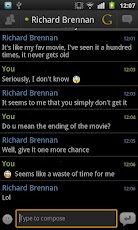
G-Talk Icon လန္းလန္းေလးသံုးခ်င္ရင္

သံုးဖူးတဲ့သူေတြ ၊ရွိျပီးသားလူေတြအတြက္ေတာ့ အသစ္အဆန္းေတာ့ မဟုတ္ေလာက္ပါဘူး မေန႔ကမွစက္မွာ
G-Talk အဆင္သင့္ Run ျပီးသားမရွိတာနဲ႔ စက္ထဲမွာအဆင္သင့္ သံုးလို႕ရတာေလး ပံုမွန္သံုးေနက်G-talk
green ေလးသံုးမလို႔ ၾကည့္လိုက္တာ ဒီေကာင္ေလးကိုေတြ႕တာနဲ႔ စမ္းၾကည့္လိုက္တာ သံုးရတာလဲအဆင္ေျပ
သလို အဆင္ေျပတယ္ဆိုတာ ကၽြန္ေတာ္ကရွင္းရွင္းေလးေတြပဲ ၾကိဳက္ေတာ့ကၽြန္ေတာ့္ အတြက္ေတာ့အဆင္ေျပ
လို႔ကၽြန္ေတာ္နဲ႔အၾကိဳက္တူတဲ့ သူေတြရွိရင္လဲ သံုးလို႔ရေအာင္ တင္ေပးလိုက္တာပါ..ကၽြန္ေတာ္ၾကိဳက္တာက
ေတာ့ Task Bar ထဲထည့္ထားလိုက္ရင္ လူပံုေလးနဲ႔ဆိုေတာ့  ၾကည့္လို႔လွသလို ျပီးရင္မသံုးဘူးတဲ့ဆိုရင္ G-talk
မွန္းေတာင္သိမွာမဟုတ္ပါဘူး..ကၽြန္ေတာ္နဲ႔ အၾကိဳက္ခ်င္းတူရင္ေတာ့ ေအာက္မွာသာ
ယူသြားလိုက္ပါ..

Download Here 

Wednesday, February 20, 2013

Padamyar FM Beta

Padamyar FM


ျမန္မာျပည္တြင္းရွိ FM ခ်စ္ပရိသတ္မ်ားအတြက္ Padamyar FM ေရဒီယိုကို ကို အြန္လုိင္းရွိရံုျဖင္႕ နားေထာင္ႏိုင္ေတာ႕မည္ျဖစ္ပါတယ္။ Beta Version ျဖစ္ေသာေၾကာင္႕ Radio နားဆင္မွဳကိုသာ ျပဳလုပ္ႏုိင္မွာျဖစ္ျပီး အျခားေသာ လုပ္ေဆာင္ခ်က္မ်ားသည္ Full Version တြင္ ပါ၀င္လာမည္ ျဖစ္ပါသည္။
Android Application အတြက္ Download ျပဳလုပ္ရန္
Padamyar FM Android Beta Version
iOS Application အတြက္ Download ျပဳလုပ္ရန္
Padamyar FM iOS Beta Version

Tuesday, February 19, 2013

Smart Pro ဂ်ာနယ္အတြဲ ၁ အမွတ္ ၅ (20.2.2013)

အပတ္စဥ္တင္ဆက္ေနက်ျဖစ္ေသာ Smart Pro ဂ်ာနယ္ အတြဲ (၁) အမွတ္ (၅)ကုိေအာက္က link မွာ download ရယူနုိင္ပါျပီ


Smart Pro ဂ်ာနယ္ အတြဲ ၁ အမွတ္ ၅ (20.2.2013) ေန႕ထုတ္အားရယူရန္